- Oct 21, 2026
- --
Better headless with Magnolia DXP
-
 Christopher ZimmermannPrincipal Product Manager, Magnolia


Experience Magnolia in action
Experience Magnolia's key features firsthand in an interactive product tour.
Take a tour nowBetter headless: a headless CMS with a visual editor
-
Magnolia DXP is a headless Digital Experience Platform (DXP): API-first delivery to any frontend, plus a visual editor marketers can use.
-
Marketers build and change pages from components developers provide, so new landing pages don't wait for a developer ticket.
-
Personalization, multisite, Live Copy and component inheritance all run in the visual editor, and the Delivery API returns content ready to render.
-
Developers keep their stack. Existing React, Angular and Vue component libraries work without modification, and configuration lives in YAML files in Git.
There are a lot of headless CMS out there, and they are good at what they do. They are fast to set up and do straightforward API integrations with modern frontend technology.
But Magnolia DXP stands out simply because it's just so much more than a typical headless CMS. It's actually a headless DXP.
Since 2023, visual page editing has been the big theme in the headless CMS space. Pure-play headless vendors and frontend platforms alike have added visual editors. Remember when headless CMS originally came on the scene back in 2013 or so, the mantra was "separation of content and presentation", and COPE - create once, publish everywhere. This was noble and good, but they just took it a little too far. In practice, it meant that the editing experience was just long forms, and editors were supposed to just enter content with no context and no visual experience.
Meanwhile at Magnolia DXP - while we've fully embraced headless techniques - we've also continuously provided a visual editing experience that authors appreciate and rely on.
For the last few years it's been trivial for us to position ourselves in the market - "we're the fully headless CMS with a visual page editor." Mic drop. Well, we have to get off our laurels and get into more detail on why Magnolia DXP is built for big headless projects.
What sets Magnolia DXP apart for headless projects
So let's take a look at some of the key features of a CMS that has focused on visual editing since its inception, and which continue to set us apart.
In a nutshell, Magnolia DXP's unique selling point is that it combines batteries-included DXP power and features with the agility, flexibility and frontend focus of headless CMS.
What does this mean in concrete terms?
Integrated visual authoring & composition
In Magnolia DXP, the visual editing experience is not only about creative composing and high-fidelity preview, it is the stage for its most powerful features. It's true that with the headless approach, developers can integrate anything in the frontend with code. That's one of the reasons headless has become so popular.
But a huge part of CMS/DXP projects is to bring this capability to non-technical users. This is what Magnolila DXP does in its integrated visual authoring experience.
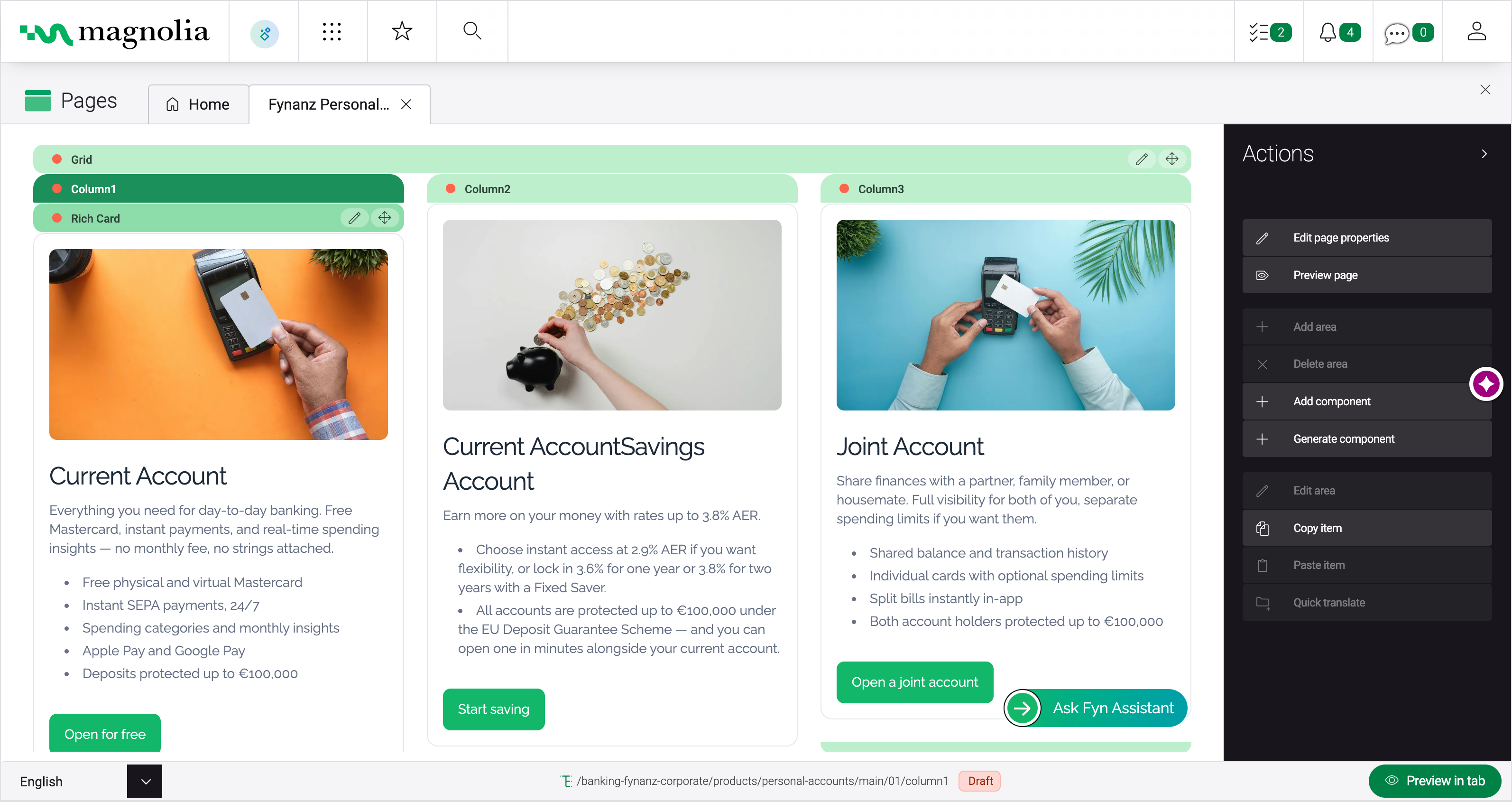
How marketing teams build landing pages without developer tickets
Developers build the components once, in the frontend framework they already use. From then on, your marketing team builds and changes pages itself, inside the roles and approvals IT defines.
Developers implement the components in React, Angular or Vue and configure a simple editing form for each one.
Marketers choose from those components and drag them onto the page, working directly on the live single-page app.
Authors fill in each component's form in context and check the draft across mobile, tablet and desktop viewports.
The editor submits the page for review, and the publisher approves it before it goes live.
See the visual editor in action
Take a guided product tour and see how marketers build and preview pages in Magnolia DXP.
Take the tourEmmi shows what this looks like at scale. It moved 80 websites from different content management systems onto Magnolia DXP and now launches a new website in an average of three weeks, at about a tenth of its previous web production cost.
How Emmi launches a new website in three weeks
Emmi moved 80 websites onto Magnolia DXP. Its brand managers now coordinate every brand from one central system, at a tenth of the previous web production cost.
Read the case studyPersonalization
Marketers can define audience segments based on out-of-the-box (OOTB) traits like country or whether the user is a repeat visitor, campaign query strings (like Google UTM parameters), browsing behavior on the site, or any custom traits that are provisioned for a customer data platform (CDP) or marketing automation tools that the project uses. Then authors can target content variants to any of those segments directly in the visual page editing experience.
Once set up, authors can preview how every page will look for every segment or combination of traits.
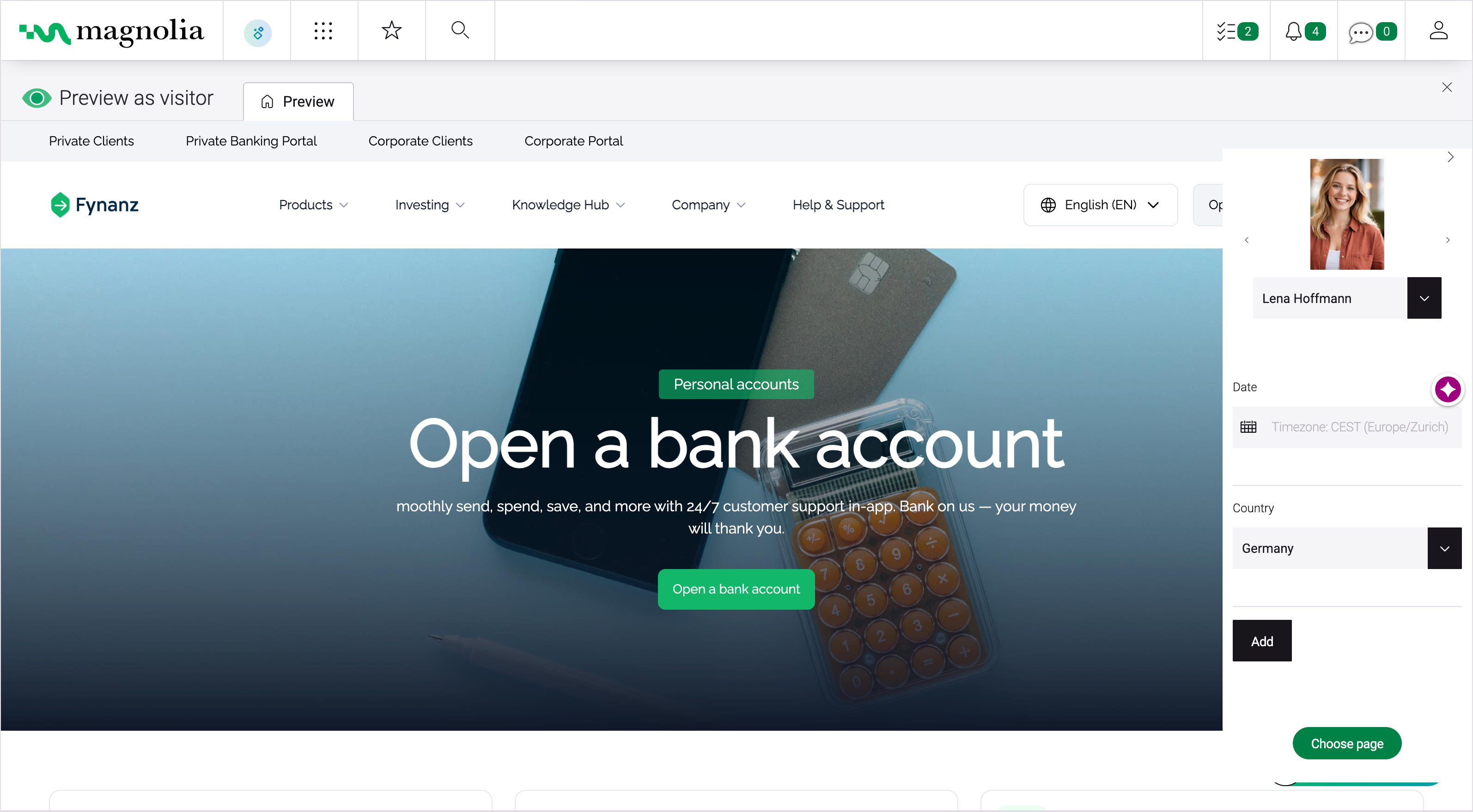
The content delivery API serves the personalized content so that developers can easily create personalized experiences without any special logic, it is ready to render.
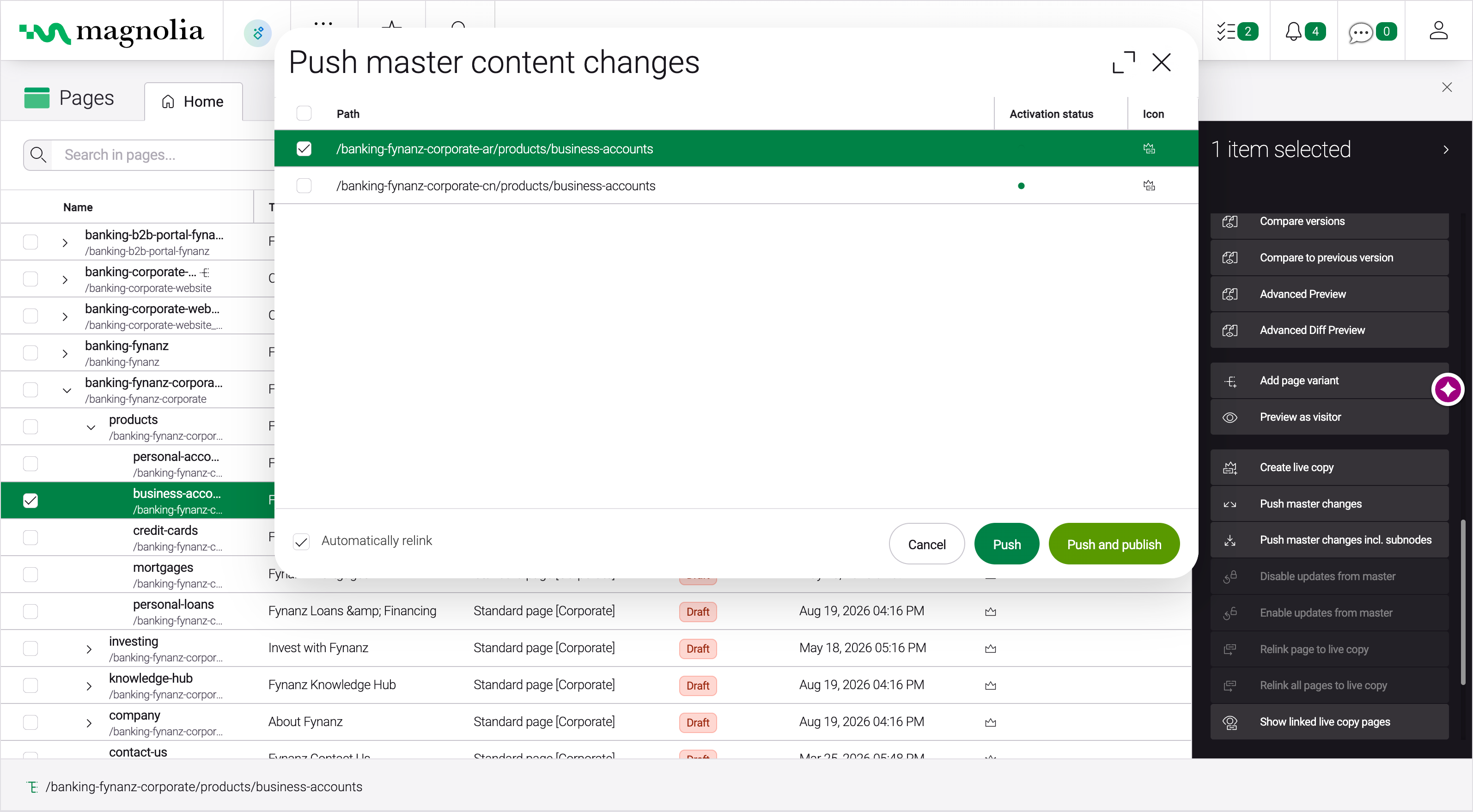
Multisite, multi-language and live copy
Enterprises can have 10s, 100s, or even 1000s of websites. Orchestrating content and translations is one of the hallmarks (and main pains) of enterprise projects. While there are some common patterns, most enterprises have unique requirements based on their content and experience strategies. A strength of our multisite capabilities is the ability to easily reuse content, templates or configuration across multiple sites. This avoids duplication and its attendant problems.
For sites requiring multiple languages but the same content structure, customers should go with the "single tree" site approach. Each page, or content item has translations for each supported language.
For customers with different content structures per language, they can take the multi-tree approach, one tree for each language. This is pure flexibility, but can be harder to maintain.
Live Copy, available as an add-on, combines the best of both approaches. Authors create the primary "master" content (in multiple languages) in a single tree. Then new sites can be created (For example for each hotel in a chain) with links to the master content. Each site can choose where to have custom content - and where to have Live Copies, so that they are always up to date with any changes on the master content.
As with personalization, it's trivial for frontend developers to work with multi-site and live-copy powered content. The content delivery API gives developers the correct content, ready to render.
Component inheritance
Magnolia DXP's visual editor has an elegant approach for developers to define which components of a page are also rendered on subpages. This is typically used for the header and footer area of a page or digital experience.
It can also be used for sidebars, extras, or any kind of section content. For example an author adds a promotion to a top section page, and now that promotion is included on every subpage of that section page.
For the developer - it's the same story as before - the Delivery API prepares and delivers the content with any inheritance applied. So the developer just needs to render it as is.
Campaign Management
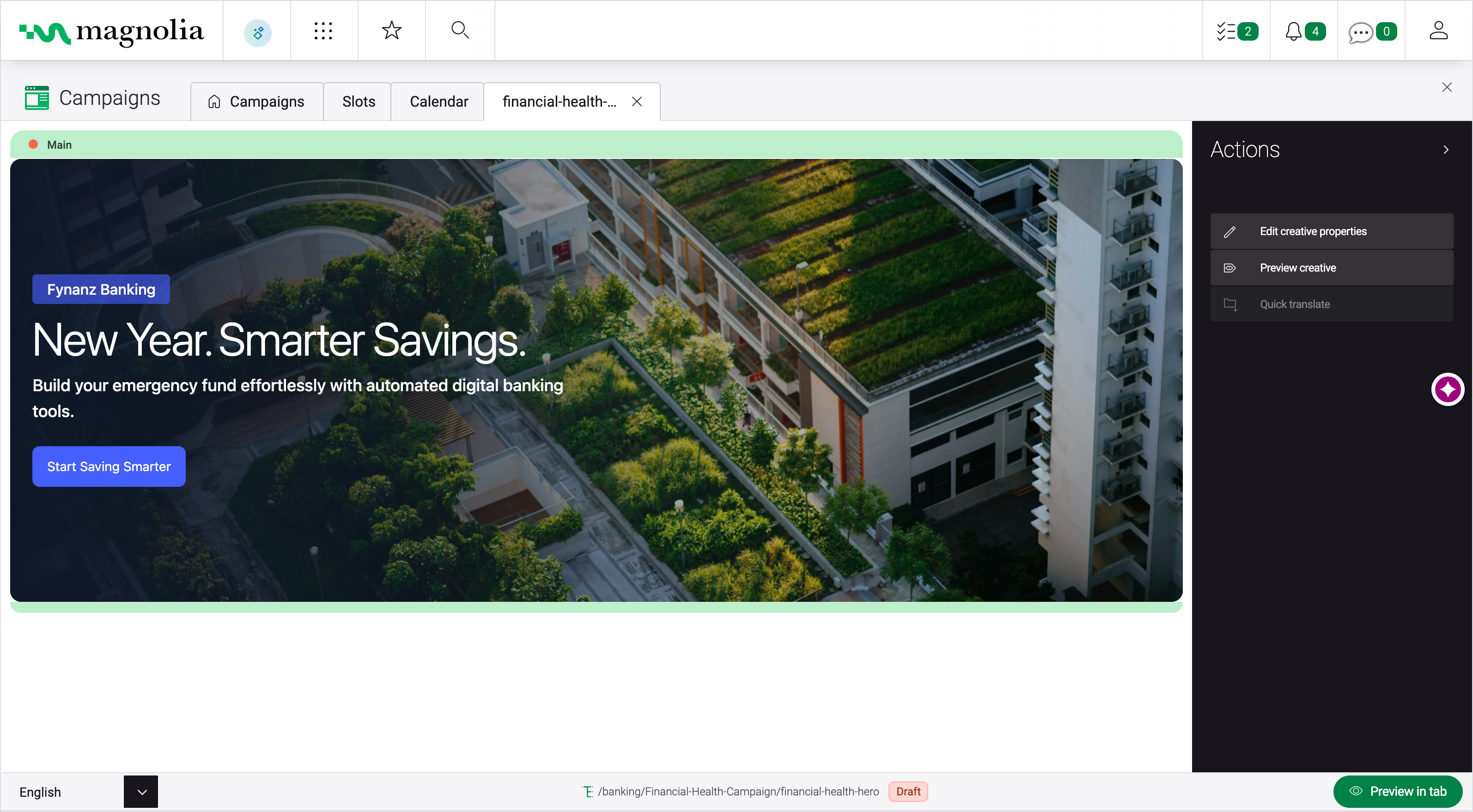
The Campaign Manager, a free extension on the Magnolia Marketplace, uses the visual editing UI to let authors edit and maintain fragments of content (In this case something like a banner). Authors can then place campaign manager "slot" components on the pages of the website. Those slot components will then display one of the banner fragments based on scheduling or other factors.
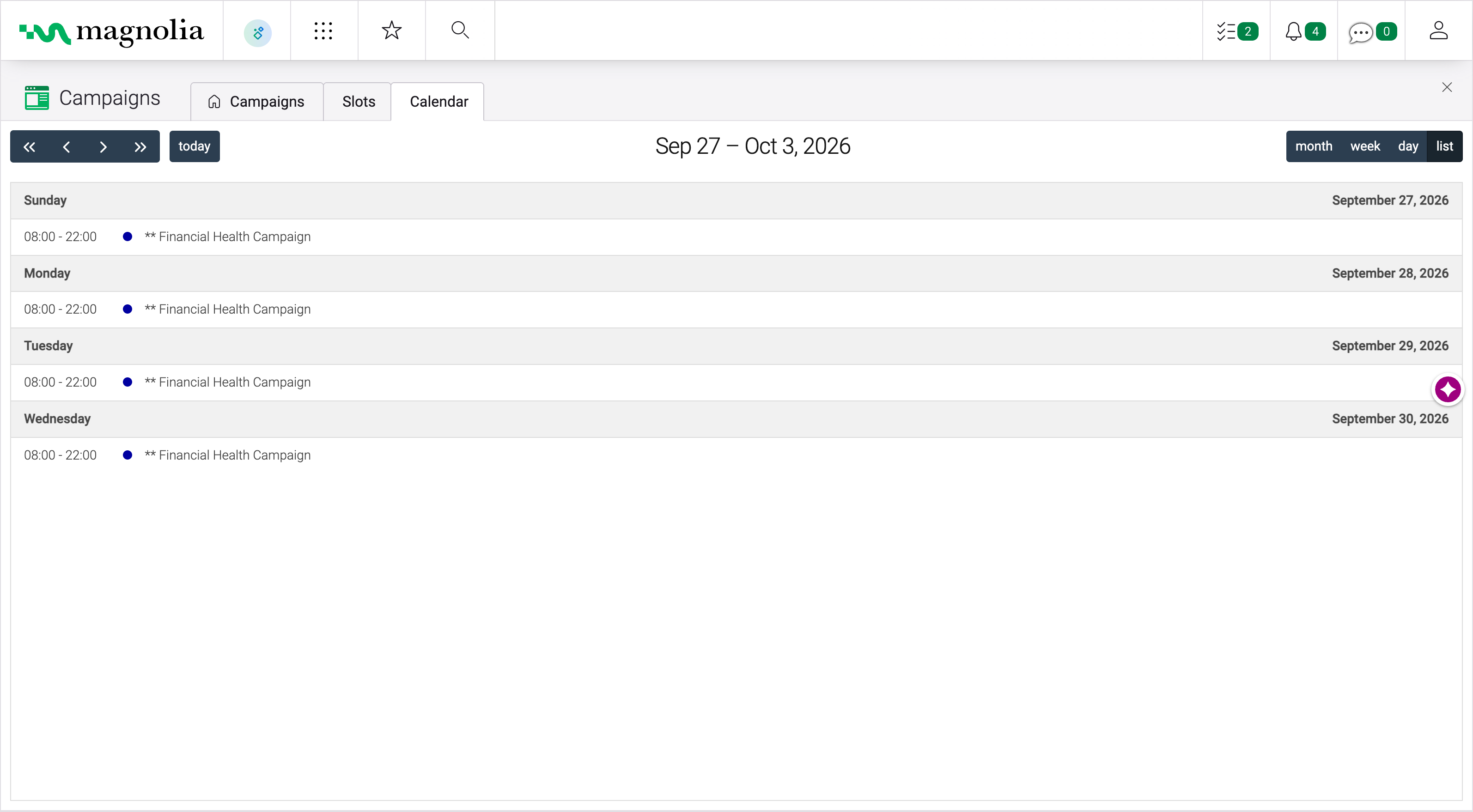
Note that this is an example of another powerful Magnolia DXP feature. Besides the stock "Pages App", developers can provision additional apps that include the Visual Page Editor UI. Another example of a use-case for this is managing content from different channels in different apps - like a digital signage channel.
Content trees
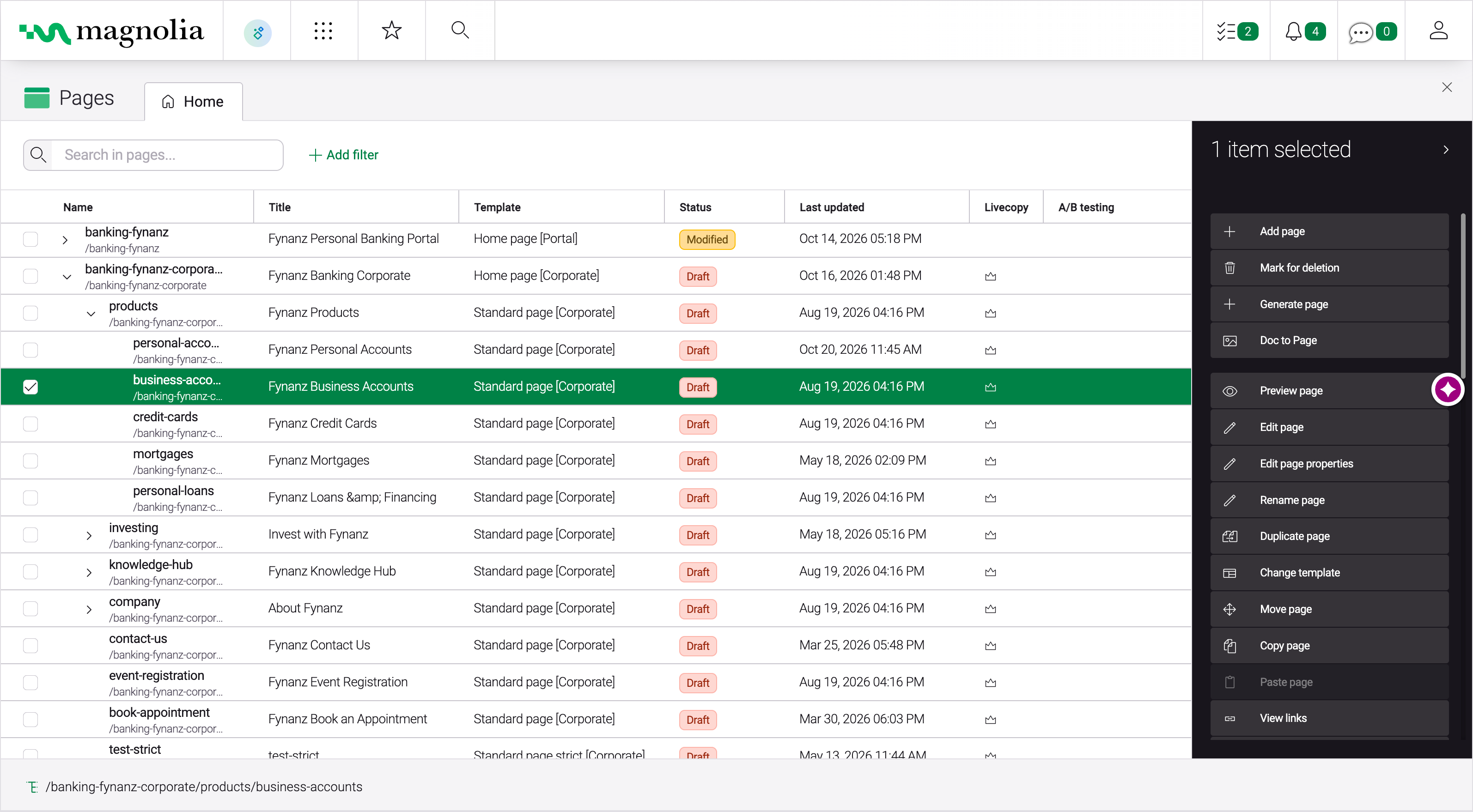
Well you might expect this from a product called Magnolia DXP. But many headless CMSs store content as flat lists rather than trees. By tree, I mean a set of nested directories (folders) that store the content, just like pretty much every software system out there- like Windows and Mac OS, Google Drive, Evernote, wikis etc. Folders alone aren't enough either: authors also need to set the order of the items inside them.
Of course it can also be valuable to treat content as a list, and of course Magnolia DXP does that too - but our customers mostly organize their content in trees, since it is so intuitive.
And the Content Delivery and Content Management APIs support working with hierarchical content.
The CMS comparison guide
Compare monolithic suites, pure headless CMSs and composable DXPs across developer experience, authoring, total cost of ownership and AI readiness.
Get the guideConclusion
Content flows
One way to look at these features is that they are all unique and pragmatic use cases of content reuse and content flows. Your marketers want to leverage the right content in the right place at the right time. True to the COPE best practices, you can orchestrate content so that there are no maintenance headaches associated with duplicated content. You can create one content item, and publish it everywhere - not just to other channels and devices, but also within a channel or experience. Have another look at the features above, notice how each one is controlling content flows.
Pure-play headless CMSs can add authoring features like these, but usually through custom development or extra tools. In Magnolia DXP, they come built in.
If you aren't giving your marketing team features like this, in a UI they can use, you're putting the business at a disadvantage.
Development
Developers get all of the above features out of the box, so they don't need to recreate them or spend time integrating a custom tool. So they can get started on the actual project right away.
Magnolia DXP development stands out from the crowd with its "infrastructure as code" approach. In Magnolia DXP, developers don't need to configure things by hand in the GUI. Developers control the features by lean YAML configuration files in a git repository: transparent, great for cooperation, and ready to deploy at any time. It's the way developers are used to working. Magnolia DXP instantly picks up every change to the configuration. This configuration-based approach is great for agencies and system integrators as it is trivial to re-use in-house design systems and best practices across many projects. And it makes it fast to start new projects.
Headless & frameworks
With Magnolia DXP's approach to headless, you can use your in-house or any off-the-shelf React, Angular and Vue component libraries with no modification. Developers just define the editing forms, and the content that authors enter in the forms will automatically be passed in as the components "props".
Magnolia CLI
Magnolia CLI, our plugin-based command-line interface (CLI), speeds up developers' daily work. Its plugins jumpstart new headless or FreeMarker projects, start a Magnolia webapp, and create the pages and components that authors use in the visual editor, with component libraries for React, Angular and Vue.
Wrap up
Of course there is much more to Magnolia DXP - but I wanted to focus on these things most closely related to headless and visual editing.
I hope that this blog has made you excited to try one of these features.
If you are curious what we have been up to lately with the developer experience of Magnolia DXP - check out our post on the latest Magnolia CLI: Streamlining the developer experience with the new Magnolia CLI version 5
How to choose the best headless CMS
Compare slim headless solutions with Magnolia DXP across technical foundation, authoring experience, platform and key features.
How to choose the best Headless CMS